New Year, Better Emails
Why it’s time to retire Podio’s Send Email Action
Upgrading how your workflows send email is one of the easiest improvements you can make this year.
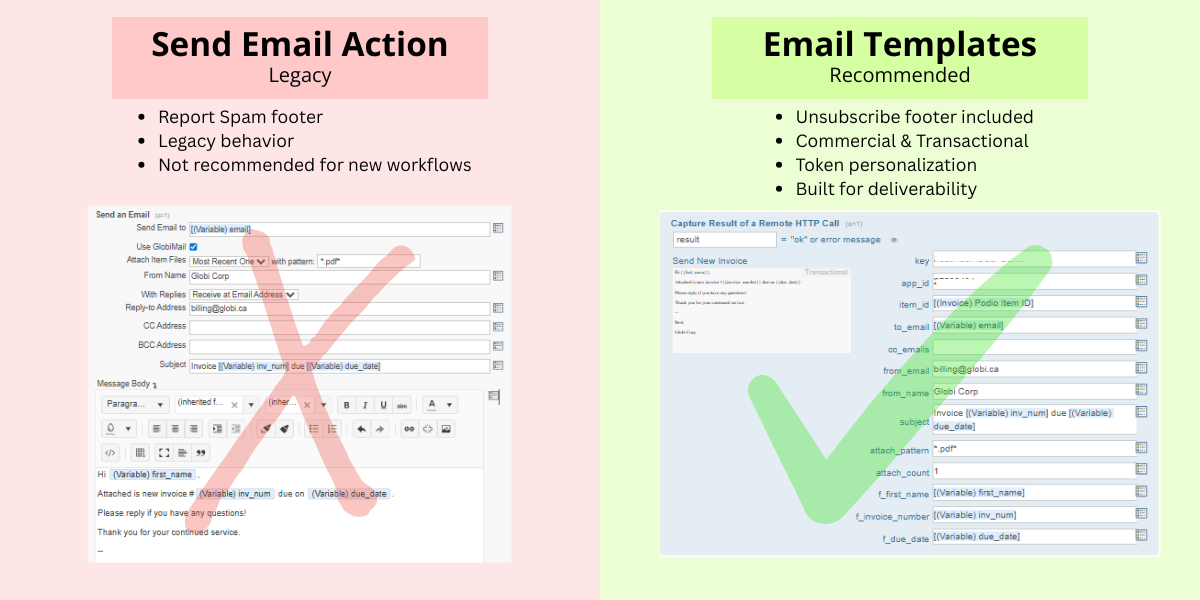
Many Podio Automation Workflows send emails reliably every day. They trigger on time, deliver the right information, and quietly do their job in the background. But as email requirements and platform features evolve, how those emails are sent has become just as important as when they’re sent.
If your workflows are still using the Send Email action with GlobiMail enabled inside it, it’s worth taking a closer look. That approach is not the most reliable or up-to-date option available.
Why the send email action is no longer the best choice
Using GlobiMail within the Send Email action was useful when it was first introduced. Today, it’s considered a legacy feature and is no longer the recommended approach for new or updated workflows.
While it may still function, legacy features come with limitations:
- They may behave inconsistently over time
- They may not receive improvements or fixes
- They carry a higher risk of unexpected issues in production workflows
For automated systems that run at scale, that kind of uncertainty matters.
The case for GlobiMail Email Templates
Email Templates are the recommended way to send emails from Podio workflows using GlobiMail. They are designed to align with up-to-date best email practices while providing greater reliability and control.
Templates support both Commercial and Transactional email types, allowing you to clearly define the intent of each message. This distinction matters not only for compliance, but also for deliverability and sender reputation.
Deliverability starts with the right footers
One of the most important differences between these approaches is how email footers are handled.
- GlobiMail Email Templates automatically include an unsubscribe footer, helping ensure compliance with email sending standards.
- Podio Workflow Automation, when using the Send Email action, adds a report spam footer.
Spam reports are taken very seriously by email providers. Repeated spam complaints can damage sender reputation and impact your GlobiMail account standing. Using Email Templates helps reduce this risk by encouraging recipients to unsubscribe rather than report messages as spam.
Personalization without losing flexibility
Switching to Email Templates does not mean sacrificing personalization.
Templates can still be customized using tokens, allowing you to dynamically insert Podio item data, user details, and other contextual information directly within the workflow action. The difference is that this personalization happens within a more structured and supported system.
A small change with long-term benefits
Updating your workflows to use GlobiMail Email Templates is a relatively small adjustment, but it offers meaningful advantages:
- Greater reliability
- Better alignment with email best practices
- Improved deliverability and account protection
- A setup that’s designed to last as platforms evolve
As you review and improve your workflows this year, how emails are sent is an easy place to start. A simple switch now can help ensure your automation continues to work smoothly, quietly, and effectively in the months ahead.
 by
Andreas Huttenrauch
by
Andreas HuttenrauchOwner of Globi Web Solutions, and Podio Fanatic.
comments powered by Disqus
Podio Alternative

InfoLobby is our new Cloud Database and Collaboration Platform. It's like Podio with GlobiFlow and GlobiMail built-in.
Why not try a 30 day free trial?
Podio Workflow Automation
Want to automate your Podio Workflows? Check out GlobiFlow for Podio